AI image generators have revolutionized the digital world. Whether you’re a content creator, designer, marketer, or business owner—AI tools can help you generate high-quality images, product visuals, concept art, logos, and social media graphics within seconds. In 2025, AI design has become more powerful, realistic, and accessible than ever before.
This article compares the Best AI Image Generator Tools of 2025 to help you choose the right one for your creative needs.
Why Use AI Image Generators in 2025?
AI Image Generators can turn text prompts into stunning visuals instantly. They are widely used for:
1. Social Media Content
Create thumbnails, ads, posters, and eye-catching visuals.
2. Product Mockups
E-commerce brands use AI for product photos and catalog images.
3. Art & Illustration
Artists generate concept art, sketches, anime art, and digital paintings.
4. Business Branding
Logos, icons, website graphics—all can be generated with simple prompts.
5. Marketing Materials
AI tools help marketers generate fresh ideas faster.
Best AI Image Generator Tools (2025)
1. Midjourney – Best for Hyper-Realistic AI Art
Midjourney is the most popular AI image generator for highly detailed, photorealistic, and artistic visuals. It produces stunning images through Discord-based commands.
Key Features
- Ultra-high detail
- Realistic lighting
- Artistic style customization
- Fast generation
- Very powerful AI model
Pros
- Best quality images in the world
- Perfect for product renders
- Hyper-realistic faces & scenes
Cons
✘ No free version
✘ Requires Discord
✘ Learning curve needed
Best For: Professional designers, artists, advertisers
Official Website: https://www.midjourney.com/
2. DALL·E 3 (OpenAI) – Best for Accuracy & Story-Based Images
DALL·E 3 is famous for generating images that perfectly match text prompts, including story scenes, book covers, and branded images.
Key Features
- Extremely prompt-accurate
- Text support inside images
- Adobe–level composition
- Perfect for illustrations
Pros
- Best for prompt accuracy
- Great for story scenes
- Supports text-in-image
Cons
✘ Limited styles compared to Midjourney
Best For: Storytellers, marketers, educators
Official Website: https://openai.com/dall-e/
3. Adobe Firefly – Best for Professional & Commercial Use
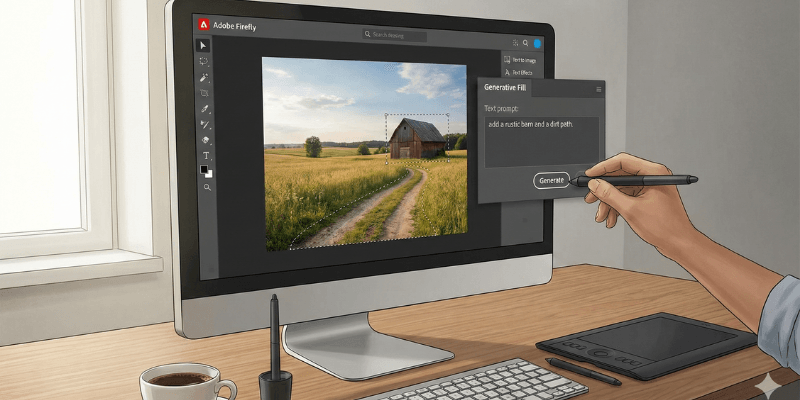
Adobe Firefly is Adobe’s own AI model built for safe, commercial-grade image generation—ideal for brands.
Key Features
- Generative Fill
- Text-to-image
- AI style variations
- Works inside Photoshop, Express & Illustrator
Pros
✔ 100% safe for commercial use
✔ Best for designers
✔ Clean and modern output
Cons
✘ Requires Adobe subscription
Best For: Agencies, graphic designers
Official Website: https://www.adobe.com/firefly/
4. Canva AI Image Generator – Best for Beginners
Canva’s AI tool is the easiest option for beginners and social media creators. It works inside the Canva editor with drag-and-drop editing.
Key Features
- Text-to-image inside Canva
- AI Magic Edit
- Magic Eraser
- Templates + AI graphics
- Beginner friendly
Pros
- Very easy to use
- Thousands of templates
- AI + design platform in one
Cons
✘ Not as detailed as Midjourney
Best For: Bloggers, influencers, marketers
Official Website: https://www.canva.com/
5. Stable Diffusion – Best Free/Open-Source AI Generator
Unlike other tools, Stable Diffusion is completely open-source. You can run it on your own PC with custom models.
Key Features
- Custom models
- Anime, photorealism, 3D, cartoon styles
- Model training capability
- Fully customizable
Pros
- Completely free
- Unlimited style options
- Community models available
Cons
✘ Requires technical knowledge
✘ Not beginner-friendly
Best For: Developers, artists, experimental creators
Official Website: https://stability.ai/
6️⃣ Bing Image Creator (DALL·E Powered) – Best Free Tool
Microsoft Bing Image Creator runs on DALL·E models and is completely free.
Key Features
- Fast generation
- Text-to-image
- Multiple styles
- Free credits daily
Pros
- 100% free
- Easy to use
- High-quality images
Cons
✘ Limited in advanced options
Best For: Casual users, students
Official Website: https://www.bing.com/create
Comparison Table (2025)
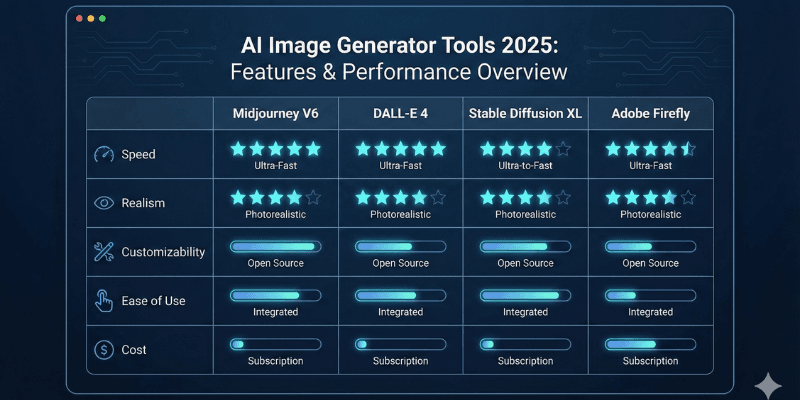
| Tool | Best For | Price | Quality | Difficulty |
|---|---|---|---|---|
| Midjourney | Hyper-realistic art | Paid | ⭐⭐⭐⭐⭐ | Medium |
| DALL·E 3 | Accuracy & storytelling | Paid | ⭐⭐⭐⭐ | Easy |
| Adobe Firefly | Professional use | Paid | ⭐⭐⭐⭐ | Medium |
| Canva | Beginners | Free/Paid | ⭐⭐⭐ | Easy |
| Stable Diffusion | Custom models | Free | ⭐⭐⭐⭐⭐ | Hard |
| Bing Image Creator | Free high-quality images | Free | ⭐⭐⭐⭐ | Easy |
Which AI Image Generator Should You Choose?
1) Midjourney delivers the most impressive image quality overall.
2) DALL·E 3 consistently provides the most accurate prompt-based results.
3) Adobe Firefly is the top pick for professional designers who need precision and control.
4) Canva AI is ideal for beginners and social content creators.
5) Bing Image Creator is the best free option available today.
6) Stable Diffusion offers unmatched customization for advanced users.
Final Verdict
AI Image Generators are becoming essential creative tools in 2025. From hyper-realistic art to marketing visuals, social media designs to illustrations—these tools allow creators to work faster and smarter.
For the best overall combination, use:
Midjourney + DALL·E 3 + Canva AI
This trio covers all needs—quality, accuracy, and ease of use.