Choosing the best laptop processors is essential if you want fast performance, smooth multitasking, and long-term reliability. From students and freelancers to office workers and programmers, your laptop’s processor determines how quickly apps load, how efficiently you can work, and how long your device will last.
In this guide, we break down the best laptop processors, explain how they work, and help you choose the right one based on your needs and budget.
What Is a Laptop Processor?
A processor (CPU) is the brain of a laptop:
It handles calculations
Opens ap Manages background tasks
- Controls multitasking
- Affects battery life
Modern laptop processors are made mainly by:
- Intel (Core Series) → https://www.intel.com/
- AMD (Ryzen Series) → https://www.amd.com/
Both brands offer powerful and budget-friendly processors for different types of users.
Intel vs AMD – Which Laptop Processor Is Better?
Two major brands dominate laptop processors:
1. Intel Laptop Processors (Core Series)
Official Website: https://www.intel.com/
Intel is known for:
- High single-core performance
- Better efficiency in ultrabooks
- Great for office, browsing, and everyday tasks
- Excellent for students & professionals
- Strong performance in older apps
Intel’s laptop series include:
- Intel Core i3 – Entry level
- Intel Core i5 – Mid-level powerhouse
- Intel Core i7 – High performance
- Intel Core i9 – Extreme performance
2. AMD Laptop Processors (Ryzen Series)
Official Website: https://www.amd.com/
AMD is known for:
- Better multi-core performance
- Smooth multitasking
- Great battery efficiency
- Strong integrated graphics
- Best performance for price
AMD’s laptop lineup:
- Ryzen 3 – Entry level
- Ryzen 5 – Mid-range productivity
- Ryzen 7 – High performance
- Ryzen 9 – Creator-class performance
Laptop Processor Levels Explained (Simple Breakdown)
Let’s break processors into usable categories so buyers understand them instantly.
Entry-Level Processors
For simple productivity, browsing, classes & streaming.
Intel Core i3
AMD Ryzen 3 Intel N-Series (N100, N200, N305)
Intel Pentium Silver
AMD Athlon Series
Best For:
- Students
- Home users
- Light office work
- YouTube + streaming
- Everyday tasks
Not suitable for heavy editing or gaming.
Mid-Range Processors
Best balance of speed, battery and value.
Intel Core i5
AMD Ryzen 5
Best For:
- Multitasking
- Office + professional work
- Light editing
- Programming
- Remote work
- Business laptop users
This is the most recommended category for 70% of buyers.
High-Performance Processors
For power users and creators.
Intel Core i7
AMD Ryzen 7
Best For:
- Heavy multitasking
- Photo/video editing
- Large spreadsheets
- Coding + development
- Light gaming
These CPUs offer excellent long-term performance.
Extreme Performance Processors
For creators, editors, engineers.
Intel Core i9
AMD Ryzen 9
Best For:
- 4K video editing
- High-end creative work
- Rendering & simulations
- Gaming + production workloads
Overkill for normal users.

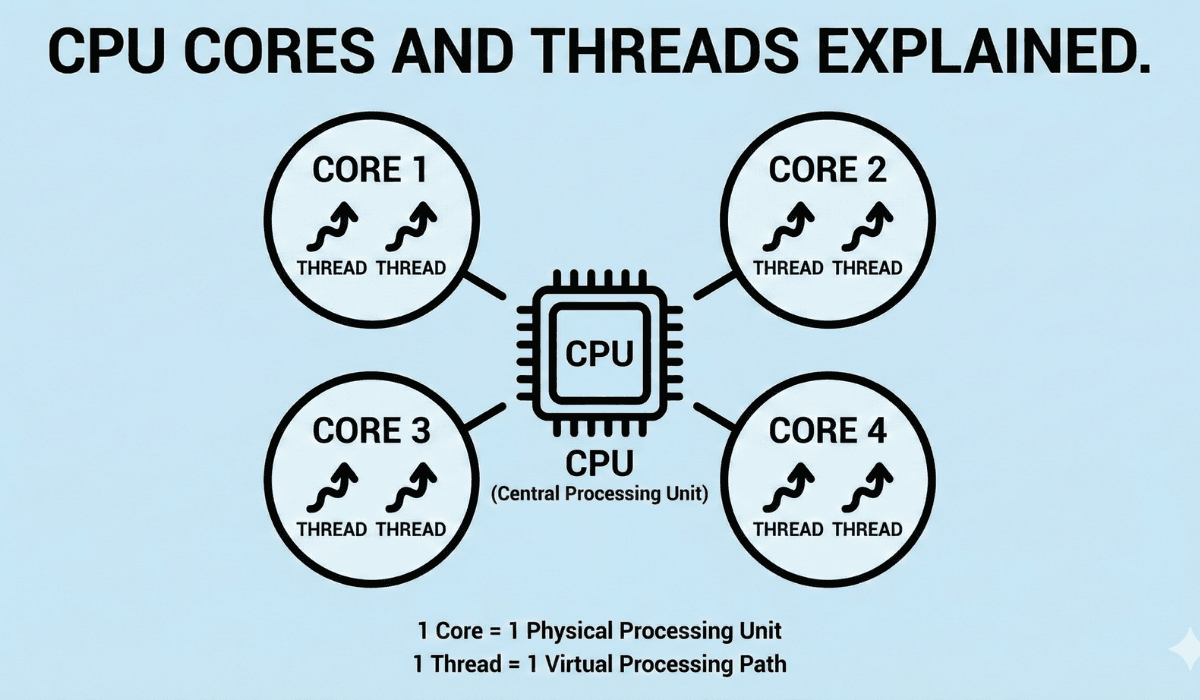
Core Count & Threads Explained (Simple Version)
Processors have Cores and Threads:
More cores = better multitasking
More threads = smoother performance
Typical laptop CPU structure:
- Entry level → 2–4 cores
- Mid-range → 4–6 cores
- High performance → 6–8 cores
- Extreme → 8–16 cores
For most buyers:
👉 4–6 cores is the sweet spot.
What Processor Do YOU Need?
Let’s break this down for different types of users.
For Students
Recommended CPU:
- Intel Core i3
- AMD Ryzen 3
- Intel N100/N200
Reason:
Fast enough for classes, research, assignments, video calls.
For Office & Remote Work
Recommended CPU:
- Intel Core i5
- AMD Ryzen 5
Reason:
Handles multitasking, spreadsheets, Zoom, emails, browsing smoothly.
For Programmers
Recommended CPU:
- Intel Core i5
- AMD Ryzen 5
- (Heavy dev tools → i7 or Ryzen 7)
Reason:
Better compile times + multitasking.
For Photo/Video Editing
Recommended CPU:
- Intel Core i7
- AMD Ryzen 7
- Intel Core i9 / Ryzen 9 (for heavy workloads)
Reason:
More cores = faster rendering.
For Casual Gaming
Recommended CPU:
- Ryzen 5
- Intel i5
(with integrated graphics like Radeon Vega or Intel Iris Xe)
For Creators & Engineers
Recommended CPU:
- Intel i7 / i9
- Ryzen 7 / Ryzen 9
Integrated Graphics vs Dedicated GPU (Quick Note)
CPU also determines your graphics.
Intel CPUs
Use Intel UHD / Iris Xe graphics
AMD CPUs
Use Radeon Vega / RDNA Graphics
AMD’s integrated graphics are stronger for gaming.
If you need heavy graphics: choose a laptop with a dedicated GPU.
Battery Life & Efficiency
Laptop CPU affects battery significantly:
Intel i5/i7 (U or P series)
Very efficient
AMD Ryzen 5/7 (U series)
Best battery life in thin laptops
Intel N-series
Extremely low power consumption
If battery life is your priority:
👉 Choose U-series CPUs (Intel/AMD).
Real-World Performance (Examples)
| CPU Type | Performance Level | Best Use Case |
|---|---|---|
| Intel N100/N200 | Basic | Students, browsing |
| Intel i3 / Ryzen 3 | Entry Level | Home use |
| Intel i5 / Ryzen 5 | Mid-Range | Office, remote work |
| Intel i7 / Ryzen 7 | High Power | Editing, coding |
| Intel i9 / Ryzen 9 | Extreme | 4K editing, engineering |
Which Processor Should You Choose?
Here’s the simplest breakdown:
- Most users → Intel Core i5 / AMD Ryzen 5
- Students → Intel N100/N200, Intel i3 / Ryzen 3
- Content creators & editors → Intel i7 / Ryzen 7
- Heavy workloads & advanced tasks → Intel i9 / Ryzen 9
- Budget-focused buyers → Intel N-series
Best for Heavy Workloads
If you need maximum performance for tasks like 3D rendering, large video editing projects, or simulation work, the Intel i9 or Ryzen 9 delivers the required power.
Best for Budget Buyers
For basic browsing, documents, and light apps, Intel N-series processors are the most cost-effective option.
Final Verdict
Choosing the right processor is the key to buying a good laptop.
You don’t need the most powerful CPU — you need the right one for your workload.
Simple Work → Intel N100 / i3 / Ryze Choosing a processor becomes much easier once you understand the difference between usage categories. For example, students don’t need the same performance level as video editors. Additionally, creators benefit from higher-core CPUs because their applications can utilize multi-threading. Therefore, selecting a processor mainly depends on your workload, not brand names or marketing labels.Everyday Office Work → Intel i5 / Ryzen Power Tasks → Intel i7 / Ryzen 7
Professional & Editing → Intel i9 / Ryzen 9
For 70% of people, the best value is:
- Intel Core i5 or AMD Ryzen 5
They offer the perfect balance of speed, multitasking, battery life, and price.
https://buyersorbit.online/best-ui-ux-design-tools-in-2025-complete-guide-for-designers-beginners
https://buyersorbit.online/best-video-editing-tools-for-beginners-free-paid-complete-2025-guide
2 thoughts on “Best Laptop Processors Explained – Which One Should You Choose?”