
When buying a laptop, the most important decision is choosing the right processor (CPU).
Two companies dominate the laptop CPU market:
Intel (Core processors)
AMD (Ryzen processors)
Both brands are powerful, fast, and reliable — but they excel in different areas.
This guide compares Intel vs AMD in a clean, beginner-friendly way so you can confidently select the right laptop for your needs — whether you’re a student, office worker, creator, or gamer.
Intel vs AMD – Quick Overview
Here’s a simple explanation before we go deeper:
Intel = Best for battery life, office work, portability
AMD = Best for multitasking, graphics, heavy workloads
Both are excellent.
But the right choice depends on your usage — not the brand name.
Brand Breakdown
Intel Laptop Processors
Official Website: https://www.intel.com/
Intel processors are known for:
- Excellent battery life
- Cooler temperatures
- Very stable performance
- Best single-core speed
- Great for office and productivity work
- Large presence in thin-and-light laptops
Intel laptop series include:
- Intel Core i3
- Intel Core i5
- Intel Core i7
- Intel Core i9

Official Website: https://www.amd.com/
AMD Ryzen processors are known for:
- Strong multi-core performance
- Better integrated graphics
- Smooth multitasking
- Excellent performance per price
- Great for editing & gaming
- Very efficient U-series chips
AMD laptop lineup includes:
- Ryzen 3
- Ryzen 5
- Ryzen 7
- Ryzen 9
Intel vs AMD – Category-by-Category Comparison
1. Performance (Speed)
Intel
Intel CPUs have stronger single-core performance, which helps in:
- Office apps
- Browsing
- Light workloads
- Old software
- Coding
- Productivity tools
AMD
AMD Ryzen CPUs have stronger multi-core performance, which helps in:
- Editing
- Rendering
- Multitasking
- Running heavy apps
Winner:
Students / Office Work → INTEL
Editing / Multitasking → AMD
2. Multitasking
Intel
Good for medium multitasking
Not as strong at high loads
AMD
Ryzen processors excel in:
- Many tabs
- Many apps
- Heavy workloads
- Background tasks
Winner: AMD
3. Battery Life
Intel
Intel U-series processors (i3/i5/i7 U) are extremely battery efficient.
Thin & light laptops with Intel often last longer.
AMD
Ryzen U-series also offer great battery life, but Intel usually wins in lightweight productivity laptops.
Winner: Intel
4. Graphics Performance (Gaming & Editing)
Intel Integrated Graphics
- UHD Graphics → basic
- Iris Xe → good for light gaming
AMD Radeon Integrated Graphics
- Much better than Intel UHD
- Comparable or better than Iris Xe
- Best integrated GPU performance
Dedicated GPU laptops
(Both brands support NVIDIA / AMD dedicated GPUs)
Winner: AMD (Integrated Graphics)
5. Heat & Cooling
Intel
Intel processors run cooler in ultrabooks.
Better thermal efficiency for light users.
AMD
Ryzen U-series are comparable.
Ryzen H-series (powerful ones) heat more during heavy use.
Winner: Intel
6. Price-to-Performance Ratio
Intel
Stable performance but generally more expensive.
AMD
Better performance per price.
Ryzen 5 often beats Intel i5 for same cost.
Winner: AMD
7. Laptop Availability
Intel
Found in almost every laptop brand and model.
AMD
Growing fast, but Intel still dominates distribution.
Winner: Intel
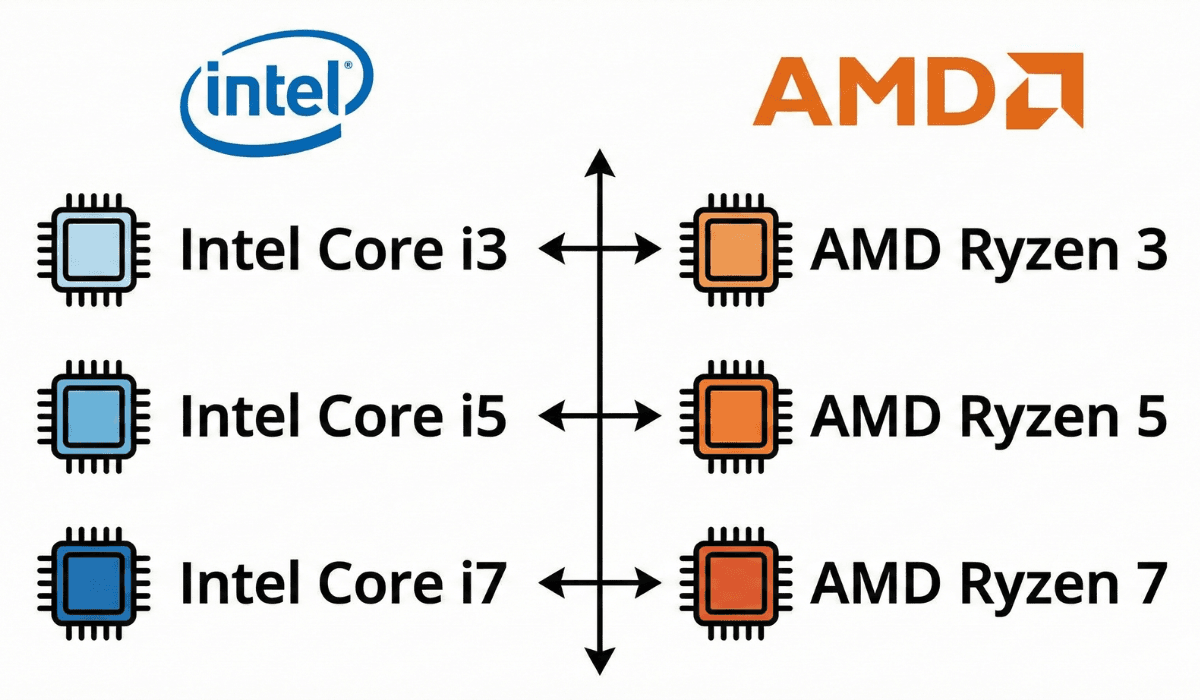
Processor Level Comparison (Simple Table)
| Level | Intel | AMD | Best Use |
|---|---|---|---|
| Entry | Core i3 | Ryzen 3 | Students, home use |
| Mid | Core i5 | Ryzen 5 | Office, multitasking |
| High | Core i7 | Ryzen 7 | Editing, productivity |
| Extreme | Core i9 | Ryzen 9 | Creators, heavy workloads |
Intel vs AMD for Different Users
Students
Recommended:
Intel Core i3 / i5
AMD Ryzen 3 / 5
Why:
- Great for assignments
- Smooth browsing
- Good battery life
- Google Docs + Zoom run perfectly
Office Workers / Remote Work
Recommended:
Intel Core i5
AMD Ryzen 5
Why:
- Excellent multitasking
- Faster spreadsheets
- Better video calling performance
Programmers
Recommended:
Intel i5 / i7
AMD Ryzen 5 / 7
Why:
- Stable performance
- Better compile times
- Smooth multi-tab coding
Creators (Photo / Video Editing)
Recommended:
AMD Ryzen 5 / 7 / 9
(or Intel i7/i9 + dedicated GPU)
Why:
- Faster rendering
- Better multi-core performance
Gamers
Recommended:
AMD Ryzen 5 / 7 + Dedicated GPU
or
Intel i5 / i7 + Dedicated GPU
AMD integrated graphics are stronger, but for real gaming → NVIDIA/AMD dGPU is required.
Home Users
Recommended:
Intel i3 / Ryzen 3
or Intel N-Series
Light tasks work great on both brands.
Summary Table – Who Should Choose What?
| User Type | Best Choice |
|---|---|
| Students | Intel i3/i5 or Ryzen 3/5 |
| Office Work | Intel i5 or Ryzen 5 |
| Editing | Ryzen 7 or Intel i7 with GPU |
| Gaming | Ryzen 5/7 or Intel i5/i7 with GPU |
| Home User | Intel N-Series or Ryzen 3 |
| Heavy Work | Intel i9 or Ryzen 9 |
Where to Buy Intel & AMD Laptops (Trusted Retailer)
Once you know whether Intel or AMD fits your needs, the next step is finding a reliable store with a wide laptop selection. eBuyer is a trusted UK-based electronics retailer that stocks many laptop options across different Intel and AMD configurations.
Official Website: https://www.ebuyer.com/
Final Verdict
Choosing Intel or AMD is NOT about which brand is better —
It’s about which CPU fits your NEED.
- Choose Intel if you want:
- Best battery life
- Office work performance
- Cooler laptops
- Strong single-core speed
- Thin-and-light portability
Choose AMD if you want:
- Best multitasking
- Better performance per price
- Strong integrated graphics
- Editing + creative workloads
- Smoother heavy tasks
If you want the BEST value for most users:
👉 Intel Core i5 or AMD Ryzen 5
They offer the perfect balance of speed, battery, and price.
https://buyersorbit.online/best-ui-ux-design-tools-in-2025-complete-guide-for-designers-beginners
https://buyersorbit.online/best-video-editing-tools-for-beginners-free-paid-complete-2025-guide